
Low Stock Alerts: How to Set Them Up and Stop Stockouts
Low-stock alerts are reminders that a product’s available quantity has reached a threshold chosen for that item or store. They do not decide how much to reorder. Pick a threshold using your own demand, supplier timing, and buffer, then review it when those conditions change.
A low stock alert is a message that tells you a product is running short while you can still do something about it. You pick a number. When the quantity on hand falls below it, you get an email, a text or a line in a report. Then you reorder before the product sells out and the listing goes dead.
This guide covers what low stock alerts are, how to choose the right number, how to set them up in Shopify, what the tools cost, and why the alert is only half the job. We run ShelfSparrow, so we also say where we fit and where other options may suit you better.
TL;DR
- A low stock alert fires when inventory drops below a threshold you set. It is an internal warning for you, not a message to customers.
- The right threshold depends on how fast an item sells and how long your supplier takes to deliver. A single number for every product usually fails.
- Shopify gives you two native routes: an alert app from its App Store, or Shopify Flow, its free automation tool.
- Too many alerts get ignored. Fewer, better-tuned alerts and a daily summary work better than an inbox full of pings.
- If you want the alerts and the listing fixes handled for you, ShelfSparrow does both: a $297 one-time audit and $29 per month of ongoing checks.
Table of Contents
- What a low stock alert actually is
- Why low stock alerts matter for a small store
- How to choose a threshold that works
- How to set up low stock alerts in Shopify
- The part nobody tells you: alert fatigue
- Where alerts stop and listing health starts
- Our perspective: alerts are a habit, not a feature
- How the options compare
- What ShelfSparrow does for you
- Start with a store audit
- FAQ
- Sources
What a low stock alert actually is
Square’s help center describes it plainly: if an item’s in-stock quantity falls below the threshold you set, an alert is generated. The point is to avoid running out, and also to avoid over-ordering.
A few plain-word definitions help here:
- Threshold: the quantity that triggers the alert. If you set it to 10, you are warned when 9 or fewer remain.
- Variant: one version of a product, such as a size or color. A T-shirt in four sizes and three colors is twelve variants, and each has its own stock count.
- SKU (stock keeping unit): the code you give each variant so you can track it.
- Lead time: how many days pass between placing a reorder and the stock arriving.
BigCommerce says the same thing from the merchant’s side: a low-stock level gives you lead time to resupply before inventory reaches zero. It can also alert you when a product has sold out completely.
Low stock, out of stock and back in stock
These three get mixed up, and they do different jobs.
| Alert type | Who gets it | What it says | What you do |
|---|---|---|---|
| Low stock | You and your team | Stock is under your threshold | Reorder |
| Out of stock | You and your team | Stock has hit zero | Pause ads, update the listing, rush a reorder |
| Back in stock | Your customers | The sold-out item is available again | Nothing, it sends itself |
Shopify’s guidance separates the two ends clearly: low-stock alerts are internal notifications to staff that prompt a reorder, while back-in-stock alerts go to customers once a sold-out item returns. This article is about the first kind. The customer-facing kind is a marketing channel. Once a product is restocked, telling shoppers is a campaign job, and a retail marketing operations platform can help coordinate that outreach. Klaviyo, for instance, triggers its back-in-stock flows from a “Subscribed to Back in Stock” event, with settings for minimum inventory thresholds.
Why low stock alerts matter for a small store
A stockout costs more than one missed sale. The listing may sit live while the product is gone, which means a customer pays and you cancel the order. Or the listing is switched off and the page you spent months ranking drops out of view. On a marketplace like Etsy, Amazon or eBay, cancellations can also hurt how your shop is treated.
Big retailers have teams for this. You probably have you, a spreadsheet and a supplier who takes three weeks. An alert turns a nasty surprise into a calendar item.
The Reddit thread that ranks for this topic captures the usual situation: a small Shopify store with a few dozen products and lots of variants, where it is easy to lose track of low inventory. Variants are where it goes wrong. Nobody forgets the bestseller. They forget that the medium in navy has two left.
How to choose a threshold that works
Most stores pick a round number like 5 or 10 and apply it to everything. That is better than nothing, and it is also how you end up with alerts that are too early for slow sellers and too late for fast ones.
A better method uses two inputs: how many units you sell per day, and your lead time.
- Find your daily sales. Take the units sold over the last 30 days and divide by 30.
- Multiply by lead time. If you sell 2 a day and your supplier needs 14 days, you will sell 28 units while you wait.
- Add a cushion. This extra stock is called safety stock. It covers a busy week or a late shipment.
- Set the alert at that total. This is your reorder point: the stock level at which you place the next order.
Shopify’s own Stocky documentation works this way. Its Low stock report uses lead time and sales per day to show the reorder point, the stock needed to cover lead time and the estimated days until you run out. That page lists availability through August 31, 2026, so check in your admin whether the tool is still offered to you before you build a routine around it. The method itself works in any tool or a plain spreadsheet.
If you want the statistical version, DataHub Pro explains that safety stock can be calculated with a formula that includes a Z-factor of 1.65 for a 95% service level. In plain words: you decide how often you accept running out (here, about 1 time in 20), and the formula adds a cushion sized to how bumpy your sales are. Most small shops do fine with a simple cushion of a few days of sales.
A worked example
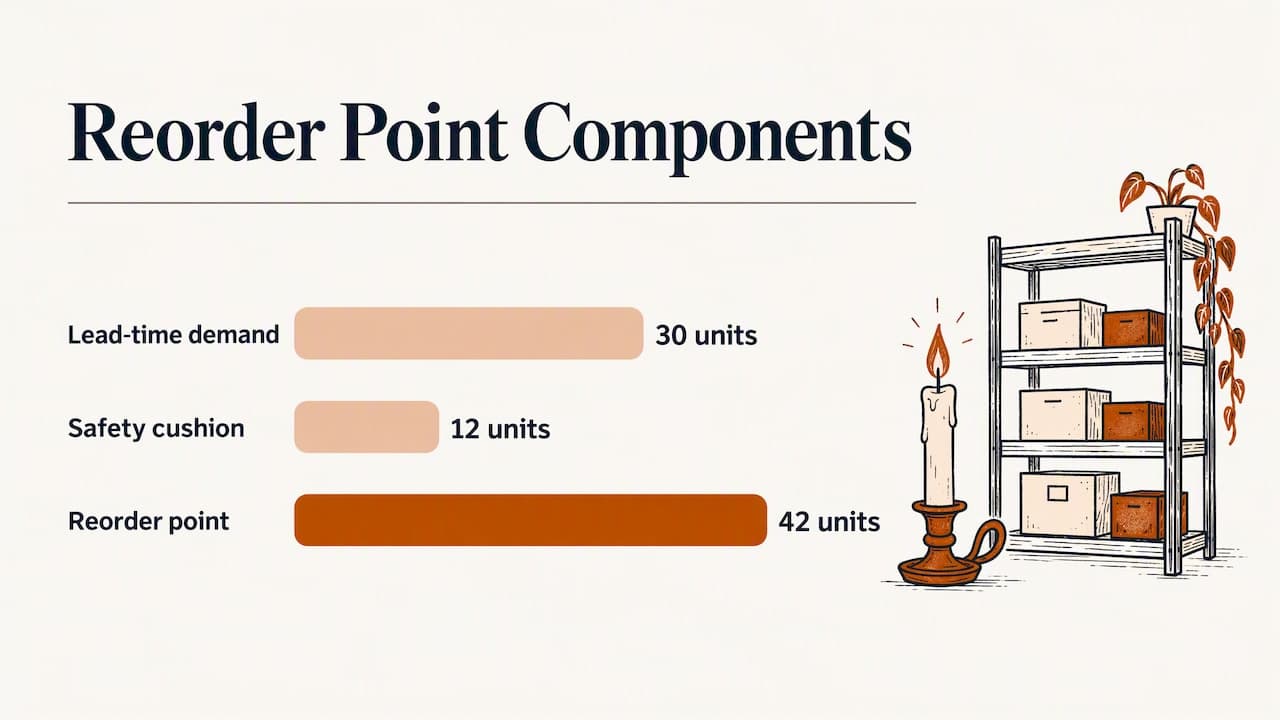
Say you sell a candle that moves 3 units a day. Your supplier ships in 10 days. You want a 4-day cushion.
- Lead time demand: 3 × 10 = 30 units
- Cushion: 3 × 4 = 12 units
- Reorder point: 42 units
An alert at 10 would reach you about 3 days before you sell out, with 10 days of waiting ahead. An alert at 42 reaches you in time. Same product, very different outcome.
A sensible habit: group products into fast, medium and slow sellers, and give each group its own threshold. Three numbers are easy to maintain. Three hundred are not.
How to set up low stock alerts in Shopify
Shopify does not push low stock emails to you out of the box. Its help center says that merchants who want direct low-stock notifications can install an inventory alert app or use Shopify Flow. You have two routes.
Route 1: an inventory alert app
An app from the Shopify App Store watches your stock and sends a message when a product crosses the threshold. According to Shopify, these apps monitor inventory and send automated SMS or email notifications when stock reaches your chosen level, which gives you time to reorder.
When comparing apps, Shopify suggests weighing budget, ease of use and the functionality you need. In practice we would check:
- Variant-level alerts. Can it warn you about one size, not just the whole product?
- Locations. If you hold stock in more than one place, can it alert per location?
- Channels. Email only, or text and team chat too?
- Scheduling. Instant pings, a daily digest, or both?
- Limits. Free plans often cap the number of alerts or notifications.
Prices vary widely. One roundup of Shopify low-stock apps notes that Stockie has a free plan limited to one scheduled notification, and paid tiers on other apps start at a few dollars a month. Always confirm current pricing on the app’s listing, because plans change.
Route 2: Shopify Flow
Shopify Flow is Shopify’s built-in automation tool. You build a small “when this happens, do that” rule, called a workflow. For low stock, the rule reads: when a variant’s inventory changes, check whether it is under your number, and if so, email the team.
The basic steps:
- Open Flow from the Shopify admin and create a workflow.
- Choose a trigger such as a product variant’s inventory quantity changing.
- Add a condition: inventory is less than or equal to your threshold.
- Add an action: send an internal email.
- Test it on one product before you switch it on for everything.
If you want a different threshold per product, one blogger describes storing each reorder point in a Shopify metafield (a custom field attached to a product, like an extra note only your systems read) and having Flow compare stock against it. It is free, and it is more setup than most busy owners want.
Route 3: a spreadsheet
If you are not on Shopify, or you sell across several marketplaces, a spreadsheet still works. DataHub Pro recommends conditional formatting, such as highlighting rows where on-hand stock is at or below the reorder point. That is a rule that turns a cell red automatically. It will not message you, though. Someone has to open the file.
The part nobody tells you: alert fatigue
An alert only helps if someone reads it and acts. The most common failure is not a missing alert. It is too many of them.
Set everything to 10, run a sale, and your inbox gets 80 messages in one afternoon. By day three you are filtering them to a folder. The one that mattered is in there.
A few ways to keep alerts useful:
- Use tiers. Alert early on fast sellers, late on slow ones.
- Choose a digest for routine items. One morning summary beats twenty pings.
- Save instant alerts for what hurts. Bestsellers and items with long lead times earn an immediate message.
- Retire dead alerts. Discontinued products and seasonal items should have their alerts switched off, not left to nag. If an alert keeps firing for something you will never reorder, turn that product’s alert off instead of muting the whole system.
- Name an owner. One person is responsible for acting on each alert.
Square’s help center, for example, lets you disable alert notifications for a single item, which is the right move for a product you have retired. Silencing one item is safe. Silencing everything is how stockouts happen.
Where alerts stop and listing health starts
Stock numbers are only one of the ways a live listing can lose sales. Real stores also deal with:
- Typos in titles and descriptions
- Broken or missing images
- Weak titles that bury the product in search
- Listings left live after the stock is gone
- Prices or variants that no longer match what you sell
An alert app tells you about the first problem on that list at most. The rest sits quietly until a shopper bounces to the cleaner store next to yours. That gap is why we built ShelfSparrow the way we did.
Our perspective: alerts are a habit, not a feature
We look at a lot of small stores, and the pattern is steady. Owners rarely lack information. They lack time to look at it. A dashboard with a red number is useful on the day you open it, and invisible the other 29 days.
So we do not think the answer to low stock is one more dashboard to learn. It is a steady eye on the store, every day, that handles the small stuff and speaks up about the rest. That is how we work. ShelfSparrow is a done-for-you store auditing and monitoring service, not software you have to configure and check. We watch your listings and inventory around the clock, fix routine errors like typos and broken images ourselves, flag low stock, and send you one plain-English daily summary.
Two things we would tell any owner, whether or not you ever use us. First, set thresholds by lead time, not by feel. Second, make sure the alert lands somewhere a person actually looks, at a time they actually look. A calm morning summary beats a hundred pings.
— Francis
How the options compare
Low stock alerts sit inside a bigger field of tools and services. Here is how the main choices look, using the prices each provider states. Prices change, so confirm on the provider’s own page.
| Option | What it is | Price we can state | Who fixes the problems |
|---|---|---|---|
| Shopify Flow or a spreadsheet | Do-it-yourself automation | Free on the tool side, your time to build | You |
| Alert apps | Software that notifies you | Free plans exist, paid plans vary by app | You |
| Prediko | Inventory planning software | From $49 a month | You |
| Sellbrite | Multichannel listing and inventory software | Check the provider’s page | You |
| StoreClaw | Store management tool | Check the provider’s page | Depends on the plan |
| Lydia | AI store management for Shopify and Etsy, audits across 9 categories | $497 one-time audit with a report in 48 hours, then $1,997 a month | Report first, then ongoing service |
| Speechify Boost | Audits products and drafts fixes (titles, copy, photos, meta) for you to approve, plus a weekly digest | Check the provider’s page | You approve each fix |
| OptraSeven | Shopify CRO agency (conversion rate optimization, meaning work that turns more visitors into buyers) | Deep audit at $149 as a founding offer against a $297 regular price | Agency team |
| Focused Developer | Shopify audit | €150, report in 5 business days, money back if fewer than 5 fixes are found | You, after the report |
| Upwork and Fiverr freelancers | Freelance auditors | $35 to $1,299, mostly report-only | You, with no monthly watch |
| CRO agencies | Full conversion consultancies | $1,500 to $3,000 or more for an audit | Agency team |
| ShelfSparrow | Done-for-you audit and monitoring | $297 one-time audit, $29 a month ongoing | We fix on the spot |
A few honest notes on how to read that table.
Alert software is the right call if you like tinkering and want a number to watch. It tells you what is wrong. Fixing it remains your job.
Prediko starts at $49 a month and leaves the fixing to you. Sellbrite and StoreClaw are also in this broader field of store and inventory tools. Look at each on its own page and check whether it covers the marketplaces you sell on.
Lydia is the closest branded rival: AI store management for Shopify and Etsy, with audits across 9 categories. It charges $497 for a one-time audit with a report in 48 hours, then $1,997 a month ongoing. ShelfSparrow costs $297 for the audit and $29 a month after that, so we undercut it at both ends.
Speechify Boost audits your products and drafts fixes for titles, copy, photos and meta (the short descriptions search engines show), which you then approve, plus a weekly digest. Approval-based work is a fair way to keep control. Ours is different: ShelfSparrow fixes routine issues on the spot, so they do not wait in your queue.
OptraSeven is a Shopify CRO agency with a deep audit at $149 as a founding offer, against a $297 regular price. It aims at brands doing $200k to $5M a year, and it has no $29-a-month watchdog offering. If you are in that bigger-brand lane, it may fit. For a small seller who wants someone watching every day, it is a different product.
Focused Developer offers a €150 Shopify audit with a report in 5 business days, and it offers money back if it finds fewer than 5 fixes. It is a close price rival in the small-shop lane. The difference is that you get a report, with no monthly watch after it.
Freelancers on Upwork and Fiverr run from $35 to $1,299, and most deliver a report only. Real CRO agencies charge $1,500 to $3,000 or more for a tactical audit.
What ShelfSparrow does for you
Here is the offer in one place.
- The $297 one-time listing audit. We review titles, SEO (how findable your listings are in search), typos and broken images, and we fix them within 72 hours. You get a plain-English report that puts the remaining issues in priority order.
- The $29 a month watch. Listing checks, stock alerts and a daily summary, with routine errors corrected automatically and low stock flagged to you.
- Any store, any marketplace. We audit Shopify and Etsy, and also Amazon, Walmart, eBay, WooCommerce and other online stores and marketplaces.
It is built for small online sellers who want leaks fixed, not another dashboard to learn.
Start with a store audit
If you are not sure how healthy your listings are, start with the audit. It is a single payment of $297, and the typos and broken images are fixed in 72 hours rather than listed for you to chase.
Book a ShelfSparrow store audit, then decide whether the $29 a month watch is worth it for your shop. You can also read more about how we work on the ShelfSparrow home page.
FAQ
What is the best free low stock alert option for a small store?
On Shopify, Shopify Flow is free and can email you when a variant drops below a number. Some alert apps also have free plans, though they usually limit how many notifications you can schedule. A spreadsheet with conditional formatting is free too, but it will not message you.
How do I stop low stock alerts without missing the important ones?
Turn off alerts for individual products you have retired, instead of muting everything. Move routine items to a daily digest and keep instant alerts for bestsellers and long lead times. Review your thresholds every few months so the numbers match how fast things sell now.
What number should I use as my low stock threshold?
Multiply your daily unit sales by your supplier’s lead time in days, then add a cushion of a few days of sales. That total is your reorder point. Fast sellers need a higher number than slow ones, so group products and set a few levels.
What is the difference between low stock and back-in-stock alerts?
Low stock alerts go to you and your team, and they prompt a reorder before you sell out. Back-in-stock alerts go to customers who asked to be told when a sold-out item returns. They solve different problems, and most stores eventually want both.
Can ShelfSparrow send low stock alerts for Amazon or Etsy?
Yes. We audit any online store or marketplace, including Etsy, Amazon, Walmart, eBay, Shopify and WooCommerce. The $29 a month plan covers listing checks, stock alerts and a daily summary.
Sources
- Create inventory alerts, Square Support Center
- BigCommerce Inventory Functionality
- Shopify Inventory Alerts: What They Are and How to Use Them
- Shopify Help Center, Low stock (Stocky)
- Shopify Help Center, Managing inventory
- How To Use a Low Stock Alert App To Monitor Inventory, Shopify
- How to build a back in stock flow, Klaviyo Help Center
- Inventory Management in Excel: Free Template, DataHub Pro
- How to Set Up Low Stock Alerts in Shopify Without Paying for an App
- Top 7 Best Shopify Apps for Low-Stock Alerts
- How do you track low-stock or out-of-stock items in Shopify? (Reddit)