Amazon Listing Errors: What They Mean and How to Fix Them

An Amazon listing error is a message that tells you something about a product page is wrong, missing or not allowed. Each one comes with a reference number. Some you fix in two minutes. Others need Amazon’s permission. A few can’t be undone at all. This guide shows you which is which, how to find the problem, and how to keep your catalog tidy so the errors stop coming back.
We explain every technical term as we go. If a word is new to you, the plain meaning is right next to it.
TL;DR
- A listing error is Amazon’s way of saying a product page breaks its rules. The number in the message tells you which rule.
- Codes like 5461 and 5665 are about brand permission. 8541 is about your data clashing with Amazon’s catalog. 8058 is about missing or invalid fields in an upload file.
- Inactive and suppressed listings are fixed from the inventory page: filter by status, fix the named problem, save.
- Most repeat errors come from small, boring things: typos, bad images, missing details, stale stock. Those are cheap to catch early.
- We audit any online store or marketplace, Amazon included, for $297 one time, and watch it for $29 a month.
Table of Contents
- What an Amazon listing error actually is
- The error codes sellers meet most
- Inactive and suppressed listings
- When Amazon shows errors but nothing looks wrong
- The image error that looks invisible
- Why the same errors keep coming back
- How we handle this at ShelfSparrow
- Our perspective: fix it on the spot
- How the options compare
- FAQ
- Sources
What an Amazon listing error actually is
When you create or edit a product, Amazon checks it against its rules for product detail pages. Those rules cover titles, brand names, images, required fields and more. Break one, and you get an error. Amazon describes these messages as information paired with a reference number that appears when there may be a problem listing a product. Amazon’s own help page adds that errors result when a product doesn’t comply with the Product Detail Page Rules, and that the messages work as safeguards.
So an error is not a punishment. It’s a gate. The listing waits until you fix the cause or get approval.
Two words you’ll see a lot:
- Seller Central is the dashboard where you manage your Amazon products and orders.
- ASIN is Amazon’s own ID number for a product page.
The error codes sellers meet most
Here is a plain-English translation of the codes that show up again and again. We only list codes that Amazon’s own pages explain.
| Code | What it usually means | What you do |
|---|---|---|
| 5461 | You lack permission to create a detail page for that brand | Get approval from the brand owner or Amazon, or list under your own brand |
| 5665 | The brand name you typed isn’t approved by Amazon | Enroll the brand in Brand Registry, or request permission to use an unregistered brand name |
| 8541 | Your title or brand contradicts what Amazon’s catalog holds for the same product ID | Match the catalog, or contact Seller Support with proof |
| 8058 | Required fields in an upload file are missing or invalid | Fix the file and upload again |
| 5882 | A generic listing looks like it infringes a brand’s intellectual property | Review the listing and your brand claims |
| 5885 | You tried to edit someone else’s generic page or copy it to another store | Appeal with documentation to Seller Support |
| 5886 and 5887 | Restricted edits on another seller’s generic listing | Create your own new listing |
Sources for the table: Amazon’s listing errors guide covers 5461 and 5665, the error code explanations cover 5885, 5886 and 5887, and the generic products guide covers 5882.
Brand errors: 5461 and 5665
These two trip up new sellers most. Amazon protects brands. If you type a brand name you don’t own and haven’t been cleared to use, the listing stops.
For 5665, Amazon’s advice is to enroll the brand in Brand Registry, or request permission to use an unregistered brand name if you have no pending or active trademark. Brand Registry is Amazon’s program that lets trademark owners control their brand’s pages. A trademark is the legal protection on a brand name.
No amount of tidy writing fixes these. Only permission does. Anyone who promises to “fix” a brand-approval error with a quick edit is guessing.
Catalog clash: 8541
Amazon keeps one shared page per product. If you submit a title or brand that disagrees with what’s already on that page for the same product ID, you get what Amazon’s Singapore seller guide calls a single matching error. The guide was written for that marketplace, but the logic is the same in the shared-catalog model: your data contradicts the page.
When the catalog itself looks wrong, that guide says to contact Seller Support. Expect to send proof, such as the manufacturer’s site, a catalog or product images.
Upload-file errors: 8058
Many sellers add products in bulk with a spreadsheet, called a flat file or feed file. Amazon’s error code guide describes 8058 as a data error: required fields are empty or hold invalid values. One missing cell can stall dozens of products.
Generic product errors: 5882 to 5887
Amazon’s generic product policy protects unbranded items listed with “generic” as the brand. Only the creator can modify those pages or add offers. Try to edit someone else’s, and you meet 5885, 5886 or 5887. Per Amazon’s error explanations, 5885 can be appealed with documents, while 5886 and 5887 can’t. For those two, you build your own listing.
Inactive and suppressed listings
Not every problem arrives as a code. Sometimes a listing simply goes quiet.
- Inactive means the listing exists but buyers can’t buy it. Often a required detail is missing or the price or stock is off.
- Suppressed means Amazon has hidden it from search because it breaks a content rule, such as an image problem or a missing attribute.
Amazon’s troubleshooting guide for the UK marketplace gives the route: open the inventory page, use the Suppressed or Inactive status filters, fix the named policy problem, then save so the listing is indexed again. The UK page is the source for the steps, so check the matching screen in your own marketplace. The path is similar, though the labels can differ.
A five-step routine
- Open Manage All Inventory in Seller Central.
- Filter by Suppressed or Inactive.
- Read the exact reason shown next to each product. Don’t guess.
- Fix that one thing: swap the image, fill the missing attribute, correct the field.
- Save, wait, and check the status again.
For file errors, Amazon’s guidance is to download the processing report from your upload and complete any category-required fields. The report lists each failed row and why.
When Amazon shows errors but nothing looks wrong
This is the most frustrating one, and the top results for this keyword are full of sellers describing it. One Seller Central thread describes 24 errors blocking a submit with nothing highlighted.
Two things can explain it.
First, a backend sync problem. Seller forum discussions point to a catalog lock or suppression status that throws errors unrelated to what you see on screen.
Second, a fresh check. An Amazon developer-support reply on GitHub explains that editing a listing can trigger full revalidation against current rules. A page that passed last year can fail today because the rules moved. You touched the title, and Amazon looked at everything.
What to try, in order:
- Reload and try again later. Some problems are on Amazon’s side.
- Update through a flat file or a partial update instead of the edit screen. Sellers in the forum report that this can reset a stuck error state. It’s a community tip, not a guarantee.
- Open a case with Seller Support and include screenshots and the exact error text.
The image error that looks invisible
Images cause a lot of suppressions, and the cause is often too small to see. Amazon’s UK guide says main images need a pure white background (RGB 255, 255, 255), no text or logos, and a product that fills at least 85% of the frame. The same guide notes that the automated scanner can be stricter than your eye. A background that looks white to you may be 254 in one corner.
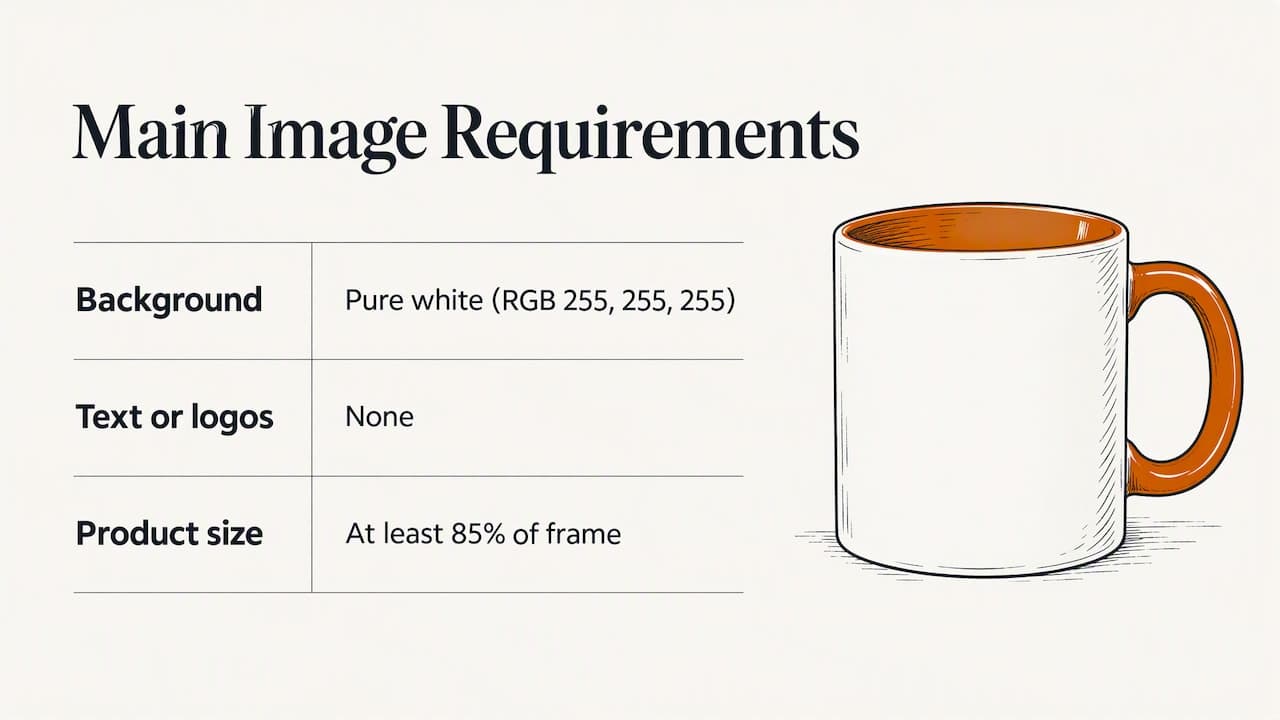
RGB is the three-number color code screens use. 255, 255, 255 is pure white. Open the image in a photo editor and check the corners with the color picker. This takes one minute and saves days of a suppressed listing.
The requirements differ by marketplace and category, so confirm them for where you sell.
Why the same errors keep coming back
Look at the list above and a pattern shows. Few errors come from big mistakes. They come from small drift:
- A typo in a title that no one reread.
- An image that was swapped and is now off-white or broken.
- A field left blank during a rushed bulk upload.
- A product that sold out and kept its old status.
- A brand name typed three slightly different ways across products.
None of that is hard. It’s just easy to forget when you’re packing orders, answering buyers and chasing suppliers. That’s where leaks start. A suppressed listing earns nothing. A listing with a typo earns less. A listing with a broken image earns less still.
A monthly self-check you can do today
- Export your inventory report and sort by status. Count inactive and suppressed items.
- Spot-check ten of your top sellers. Read the title out loud, check the main image, check that stock matches your shelf.
- Search your own brand name. Look for odd spellings or duplicate pages.
- Check any bulk file before uploading: required columns filled, no stray spaces, no invalid values.
- Write down every error code you meet and what fixed it. In three months you’ll have your own cheat sheet.
How we handle this at ShelfSparrow
We are a done-for-you store auditing service, not software. You don’t log in to another dashboard and learn another tool. We look at your listings, fix what’s broken and tell you in plain English what we did.
The audit: $297, one time. We go through your product listings for titles, SEO (the wording that helps shoppers find you in search), typos and broken images. Fixes for typos and broken images are made within 72 hours, and you get a prioritized report in plain English so you know what mattered most.
The watch: $29 a month. Listing checks, stock alerts when inventory runs low, and a daily summary that tells you the state of your store in a minute. We keep a steady eye on things so small errors don’t pile up.
We audit any online store or marketplace, including Amazon, Walmart, eBay and WooCommerce, as well as Shopify and Etsy. One honest limit: brand-approval and catalog-ownership errors, like 5461 and 5665, need an answer from Amazon or the brand owner. We can point you to them. We can’t approve them for you.
Book a store audit and we’ll start with the listings that cost you the most.

If you’d like to see everything we do first, the ShelfSparrow home page lays out the audit and the monthly watch.
Our perspective: fix it on the spot
We’ve come to one firm view. Most store owners don’t lose sales to dramatic failures. They lose them to a long tail of small, fixable errors that nobody had time to look at.
That’s why we fix typos and broken images straight away rather than sending a to-do list. A report you have to act on is one more task on a full plate. A fix that’s already done is a calmer morning.
We also think the daily habit matters more than the big audit. An audit clears the backlog. A steady watch keeps the backlog from coming back. Together they’re the cheapest insurance a small seller can buy: a little order, all day long.
And we’d rather be plain about limits. Some errors need a human at Amazon. Say so, route them correctly, and spend your energy where it counts.
— Francis
How the options compare
You have choices beyond us, and the right one depends on your size and how hands-on you want to be. Here is how the field looks at the prices we’ve seen published. Confirm current terms on each provider’s own page, since they change.
| Option | What you get | Price |
|---|---|---|
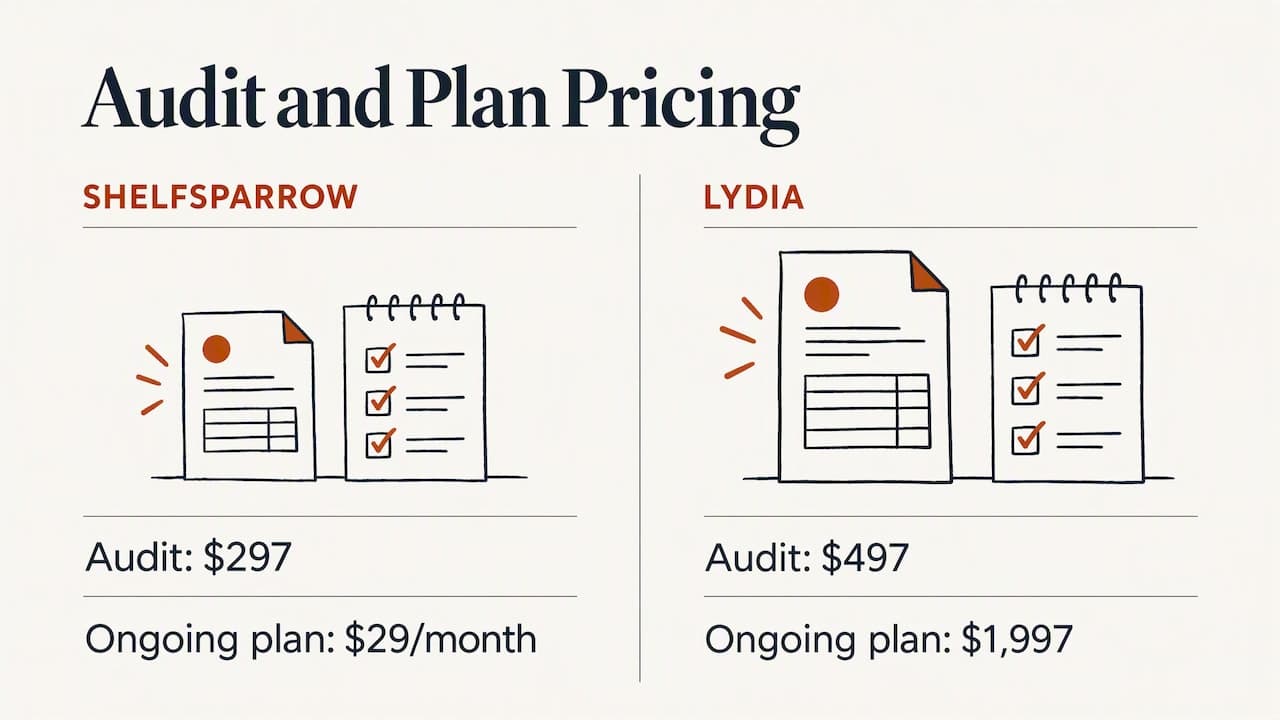
| ShelfSparrow | Done-for-you audit, fixes on the spot, then monthly checks, stock alerts, daily summary | $297 audit, $29/month |
| Lydia | AI store management for Shopify and Etsy, audits across 9 categories, report in 48 hours | $497 audit, then $1,997/month |
| Speechify Boost | Audits products and drafts fixes for titles, copy, photos and meta for you to approve, plus a weekly digest | See provider |
| OptraSeven | Shopify CRO agency, deep audit, aimed at brands doing $200k to $5M a year | $149 founding offer, $297 regular |
| Focused Developer | Shopify audit, report in 5 business days, money back if fewer than 5 fixes found | €150 |
| Upwork and Fiverr freelancers | Mostly report-only audits, no monthly watch | $35 to $1,299 |
| CRO agencies | Tactical audits by conversion specialists | $1,500 to $3,000 or more |
(CRO means conversion rate optimization: making more visitors buy.)
Reading the table honestly
Lydia is the closest branded rival. We cost $297 against $497 for the audit, and $29 a month against $1,997 for the ongoing plan.
Speechify Boost drafts fixes and waits for your approval. That suits owners who want to sign off every word. We fix issues on the spot, so the work is done when you read the summary.
OptraSeven has a lower founding-offer price on its deep audit than our $297. But it’s built for brands doing $200k to $5M a year, and it has no $29 monthly watchdog. If you’re a smaller seller who wants ongoing coverage, that’s a different lane.
Focused Developer is the nearest price rival for small shops, and its money-back promise if it finds fewer than 5 fixes is a fair guarantee. Its report arrives in 5 business days, and ours is fixed within 72 hours.
Freelancers on Upwork and Fiverr range widely, and most deliver a report with no monthly follow-up. Real CRO agencies are priced for bigger budgets.
On the software side, tools such as Prediko, Sellbrite and StoreClaw give you dashboards for inventory and listing management. They’re capable, but you run them and do the fixing yourself. If you’d rather hand the leaks to someone else, that’s the gap we fill.
FAQ
What does Amazon error code 5461 mean?
It means you lack permission to create a detail page for the brand you entered. Amazon lists it with 5665 as a brand-approval issue. You’ll need approval for that brand, or you should list under a brand you own.
Why is my Amazon listing inactive?
Usually a required detail is missing or invalid, or the offer itself (price or stock) has a problem. Open your inventory page, filter by Inactive, and read the reason shown for each product. Fix that named item and save.
What’s the difference between inactive and suppressed?
Inactive means buyers can’t purchase the product right now. Suppressed means Amazon has hidden it from search for a content-rule problem, such as a non-compliant image or a missing attribute. Both show up as status filters on the inventory page.
Can I fix Amazon listing errors without software?
Yes. The fixes happen in Seller Central, and the checks are mostly reading and spot-checking. Software can speed up watching many products. If you’d rather not do it yourself, a done-for-you service handles the checking and fixing.
Does ShelfSparrow work on Amazon listings?
Yes. We audit any online store or marketplace, including Amazon, Walmart, eBay and WooCommerce. Typos, titles, SEO and broken images get fixed within 72 hours of the $297 audit. Brand-permission errors still need Amazon’s or the brand owner’s approval.
Sources
- How to fix Amazon listing errors (Sell on Amazon)
- Error code explanations (Seller Central)
- How to sell generic products on Amazon
- Product listing error guide for sellers (Amazon Singapore)
- Amazon Listings Error Code Guide
- Fix your listing troubleshooting guide (Amazon UK)
- Listing issues appeared after updating only title (GitHub)
- Bullet Point Error (Seller Central forum)
- Errors that are not there? (Seller Central forum)