Ecommerce Data Quality: A Small Store Owner’s Guide

Ecommerce data quality means every fact about your products, such as titles, prices, stock counts, images and descriptions, is correct, complete and the same everywhere you sell. For a small store, the hard part is not knowing this. It is keeping it true week after week, while you run the rest of the business. That is why we built ShelfSparrow as a done-for-you service rather than software: a $297 one-time listing audit that fixes titles, SEO, typos and broken images in 72 hours, then $29/month listing checks, stock alerts and daily summaries to keep things tidy.
TL;DR
- Data quality is how accurate, complete, consistent and current your product information is on every channel where you sell.
- Common errors are wrong categories, missing variant details, weak images, conflicting prices and stock counts, and typos. Google can disapprove products that fail its data requirements.
- You can measure quality with a simple completeness score and a small sample check, then repeat it on a schedule.
- Cleanup is a one-time job. Keeping it clean is a daily one, and that is the part most small stores skip.
- ShelfSparrow does both for Shopify, Etsy, Amazon, Walmart, eBay and WooCommerce stores: audit and fixes first, then steady monitoring.
Table of Contents
- What ecommerce data quality actually means
- Why it matters to a small store
- The errors that show up most often
- How to measure the quality of your product data
- How to clean up product data step by step
- Prevent errors before they are published
- Software, freelancers or a done-for-you service?
- Our perspective
- Get your listings checked and fixed
- A simple monthly routine
- FAQ
- Sources
What ecommerce data quality actually means
Product data is everything a shopper or a search engine reads about an item: the title, price, size, color, description, photos, category, stock level and barcode number. Data quality is how well that information does its job.
BigCommerce’s guide describes five requirements for data quality: accuracy, completeness, fitness for use, reliability and timeliness. In plain words: it is right, nothing is missing, it fits what the shopper needs, you can trust it, and it is up to date.
For a store with 40 or 400 listings, that breaks down into questions you can answer today:
- Does the price on your store match the price on your marketplace listing?
- Does the page say “in stock” when the shelf is empty?
- Is every size and color option filled in?
- Do all the photos load?
- Is the title spelled correctly and written the way shoppers search?
A “no” to any of these is a small leak. One leak is minor. Dozens, across several channels, add up.
Why it matters to a small store
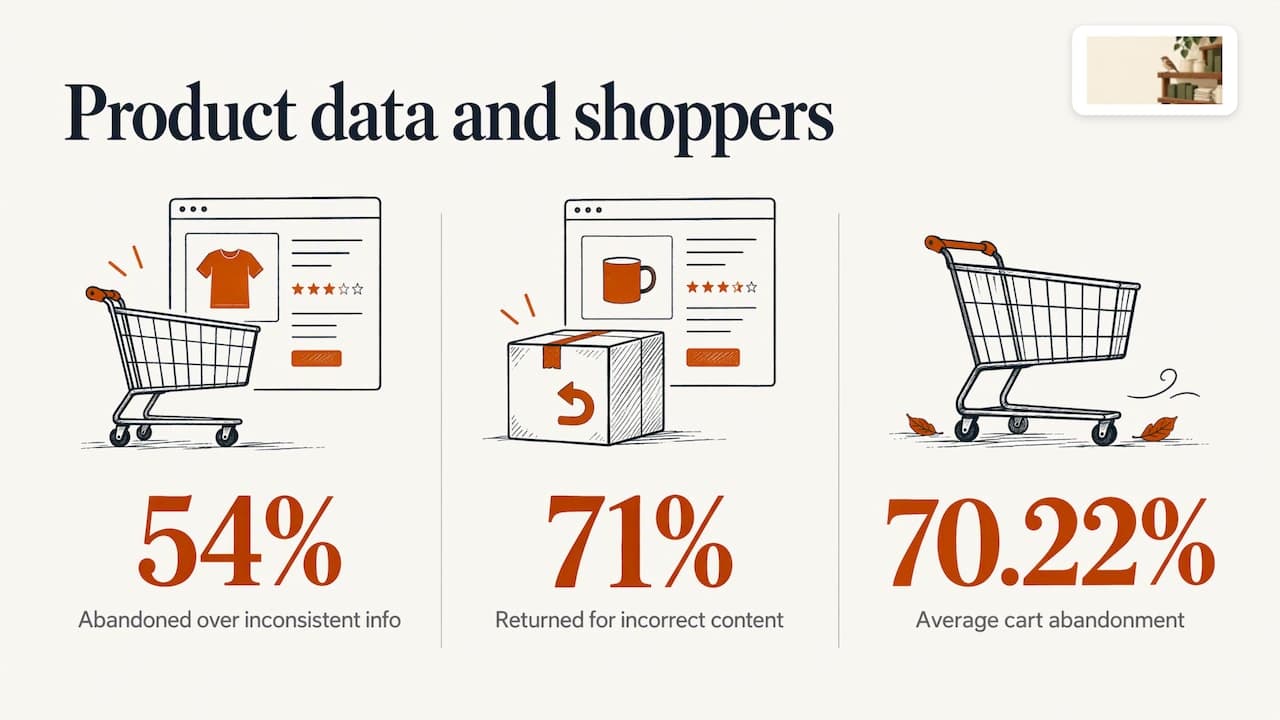
Shoppers act on what the page tells them. Salsify’s 2025 consumer research, cited in Shopify’s catalog management guide, found that 54% of shoppers named inconsistent product information across websites as a reason they abandoned a cart. It also found that 71% said they had returned a product because its content was incorrect.
The wider picture is just as clear. Baymard’s 2026 data puts average cart abandonment at 70.22%, with extra costs and slow delivery among the top reasons. Not every abandoned cart is a data problem. But a shopper who cannot trust the page is a shopper who leaves, and a cleaner competing listing is usually one click away.
There is a search side too. Google Merchant Center, the tool that feeds your products to Google Shopping and free listings, says products that fail its data requirements can be disapproved. Disapproved products won’t appear on Shopping ads or free listings, and after you fix the issue, a review can take 3 to 5 business days. A typo that sits for a month can cost you a month of visibility.
The errors that show up most often
Google’s own product data documentation lists the problems that commonly cause disapprovals, limited eligibility or incorrect displays:
- Incorrect Google product category or GTIN values. A GTIN is the barcode number (UPC or EAN) that identifies a product worldwide.
- Missing or incorrect variant attributes, such as size and color.
- Low-quality images.
- Conflicting data between your product data source and your website.
On top of those, small stores usually deal with a handful of everyday problems:
| Error | What it looks like | What it costs you |
|---|---|---|
| Typos in titles | “Ceramc mug set” | Missed searches, lost trust |
| Broken images | Empty box where the photo should be | Shoppers leave, listings can be flagged |
| Stock mismatch | Page says available, shelf is empty | Cancelled orders, bad reviews |
| Price drift | $24 on your site, $22 on a marketplace | Margin loss, confused buyers |
| Thin or copied descriptions | One line, or the supplier’s text word for word | Weak search visibility, more returns |
| Missing variants | Color listed, size left blank | Wrong-item orders, returns |
None of these is hard to fix. The trouble is that nobody sees them. They build up quietly in the background of a busy week.
How to measure the quality of your product data
You do not need a data team. You need two simple checks and a calendar reminder.
Check 1: completeness
PIM Atlas, a product information guide, lists six measurable dimensions: completeness, validity, accuracy, consistency, uniqueness and timeliness. The easiest to start with is completeness: required fields that are filled in, divided by required fields in total, times 100. If each listing needs 10 fields and your 50 listings have 450 of the 500 filled, you are at 90%. The guide’s illustrative target is 100% before a product goes live.
One warning from StartWithData: count the fields that matter most, not all of them equally. A catalog that looks 75% populated on paper can be only 50% complete on the ten attributes that drive search filtering and conversion. Missing a care-instructions field is not the same as missing a size.
Check 2: accuracy by sampling
Pick 20 to 50 listings at random. For each, compare the page to the real product in your hands or to your supplier sheet: price, size, material, color, photo, stock. Count how many are fully right. StartWithData suggests larger samples of 200 to 500 items for big catalogs and treats 97% on critical attributes as a passing mark. For a small store, the principle is the same at a smaller scale: if one in ten fails, you have a leak worth fixing.
Write it down
Keep the score and the date. The next check shows whether things are improving or slipping. If you sell on more than one channel, our checklist for checking product details across your listings gives you the fields to compare line by line.
How to clean up product data step by step
Cleanup works best in a fixed order. Here is the routine, with where each step tends to go wrong.
- List every place your product data lives. Your store admin, marketplace listings, supplier spreadsheets and that one old file on a laptop. WebPeak’s ecommerce data framework notes that shadow spreadsheets are the most common hidden source of conflicts. Where it goes wrong: you forget a channel, and it keeps showing the old price.
- Decide one master version. Pick one place where each fact is written first, and let other channels follow it. Shopify’s guide advises a single source of truth with an owner for each field. For a small team, that can be as simple as “the store admin is the master, and I change prices there first.”
- Fix the obvious errors. Typos, broken images, empty fields, mismatched prices. Where it goes wrong: this is tedious, so it gets done for the top ten products and nothing else.
- Standardize how you write things. Same units, same color names, same title pattern. Google recommends matching titles, descriptions, variants and color names between your product data and your landing pages.
- Add what is missing. Barcodes where they exist, detailed categories, variant details, real photos. Google asks for product types and categories at least 2 to 3 levels deep, and for GTINs whenever available.
- Reconcile stock. Compare the count on your listings with what is really on the shelf. Our guide to checking product availability against inventory walks through it.
- Schedule the next check. This is the step that decides whether the first six last.
Doing all this yourself is possible. It is also hours of repetitive work, and the first three steps are where most owners stall. In our audit, those are the steps we take off your hands: we fix titles, SEO, typos and broken images ourselves within 72 hours, so you are not left holding a list of to-dos.
Prevent errors before they are published
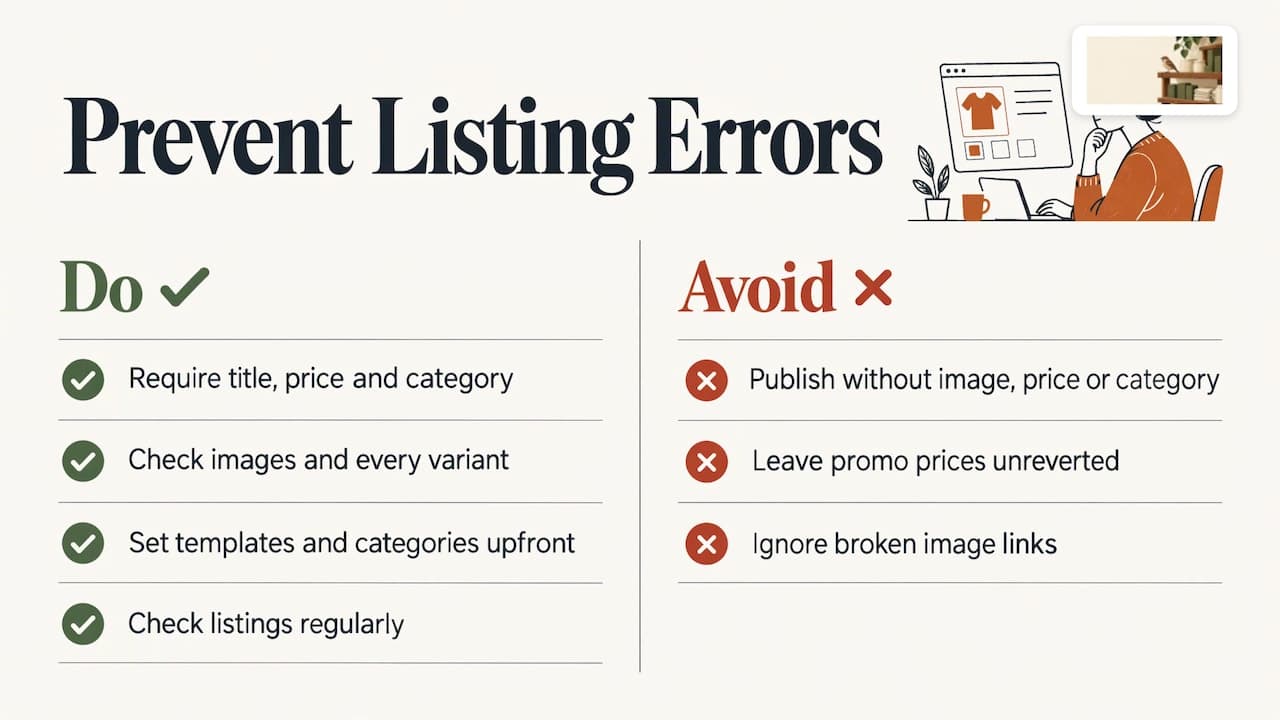
WebPeak’s framework makes a point worth remembering: cleaning data after publication costs far more than blocking bad products at creation. Its example is a product with no image, no price or no valid category. A simple entry rule helps: no listing goes live until title, price, category, at least one image and every variant are filled.
If you are launching or rebuilding a store, getting the structure right from day one saves cleanup later, for example when setting up your store properly with consistent product templates, categories and copy from the start.
Even then, things drift. A supplier changes a size chart. A promo price is never switched back. An image link breaks when a file moves. That is why prevention needs a second half: regular checking.
Software, freelancers or a done-for-you service?
There are several ways to get this work done. Here is how they compare, with prices as each provider publishes them.
| Option | What you get | Price |
|---|---|---|
| ShelfSparrow | Done-for-you audit covering titles, SEO, typos and broken images, fixed in 72 hours. Then listing checks, stock alerts and daily summaries | $297 one time, then $29/month |
| Lydia | AI store management for Shopify and Etsy, audits across 9 categories, report in 48 hours | $497 one-time audit, then $1,997/month |
| Speechify Boost | Audits products and drafts fixes (titles, copy, photos, meta) for you to approve, plus a weekly digest | Check provider |
| OptraSeven | Shopify conversion-rate (CRO) agency with a deep audit, aimed at brands doing $200k to $5M a year | $149 founding offer against a $297 regular price |
| Focused Developer | Shopify audit with a report in 5 business days, money back if fewer than 5 fixes are found | €150 |
| Upwork and Fiverr freelancers | Audits, mostly report only, with no monthly watch | $35 to $1,299 |
| CRO agencies | Full conversion-optimization work | $1,500 to $3,000 or more |
A few notes on reading that table. “CRO” means conversion rate optimization: improving the share of visitors who buy. OptraSeven’s audit is a strong fit for larger brands, and it has no $29/month watchdog offering for ongoing monitoring. Speechify Boost drafts changes and waits for your approval; ShelfSparrow fixes issues on the spot, so your list of pending approvals does not grow. Lydia’s audit costs $497 and its ongoing plan is $1,997/month. ShelfSparrow is $297 for the audit and $29/month after, which undercuts it at both ends.
Then there is the software category. Tools such as Prediko, Sellbrite and StoreClaw give you screens, reports and settings. They can be useful, but they ask you to log in, learn the tool and do the fixing. Prediko, for instance, starts at $49 a month and still leaves the fixing to you. If your goal is leaks fixed rather than another dashboard to learn, a service is the simpler path. If you still want to compare tool types, our guides to catalog management software, listing management software and image monitoring software for small stores lay out what each does.
What to look for in any data quality help
Whichever route you take, judge it on five things:
- Does it fix, or only report? A report is a to-do list. You still have to do the work.
- Does it keep watching? One audit is a snapshot. Drift starts the day after.
- Does it cover every channel you sell on? Mismatches live between channels.
- Is the report in plain English and ranked by importance? You should know what to do first.
- Is the price sensible for your size? Agency rates suit large brands. A store with a few dozen products rarely needs them.
Our perspective
Most small stores do not have a data problem. They have an attention problem. Nobody is at fault: you are packing orders, answering customers and sourcing products. Listing errors are small, quiet and never urgent, so they wait.
That is the reason we built ShelfSparrow as a service and not as software. A dashboard is one more thing to open. We would rather keep a steady eye on your listings and inventory all day, correct routine errors as we find them, flag low stock, and send you one daily summary you can read in a minute.
We start with the audit because a store needs a clean baseline. The $297 audit covers titles, SEO, typos and broken images, and we fix them within 72 hours. The $29/month service then keeps that baseline in place. We audit any online store or marketplace, including Amazon, Walmart, eBay and WooCommerce, because your shoppers do not care where the leak is. They just see the page.
The goal is a calmer week: a tidy shop, accurate listings and no surprise from a typo you never saw.
Francis
Get your listings checked and fixed
If you would rather not spend your evenings hunting typos and broken images, ShelfSparrow’s store audit is a one-time $297. We go through your listings, fix titles, SEO, typos and broken images within 72 hours, and give you a plain-English, prioritized report. After that, ShelfSparrow monitoring is $29/month for listing checks, stock alerts and daily summaries.
Shopify and Etsy sellers can also start from the listing audit page built for those two platforms.
A simple monthly routine
Whether you do it yourself or have us do it, the rhythm is the same:
- Daily: glance at stock levels and any orders that failed or were cancelled.
- Weekly: check your top sellers for price, photo and availability.
- Monthly: run the completeness score and a 20-listing accuracy sample.
- After any big change: a supplier switch, a sale, a theme update or a new channel means checking again. Shopify’s guide notes that catalogs that change often need more frequent checks than small, stable ones.
Keep it short. A routine that takes ten minutes gets done. One that takes two hours does not.
FAQ
What is ecommerce data quality?
It is how accurate, complete, consistent and up to date your product information is. That covers titles, prices, stock, images, descriptions and categories, on your own store and on every marketplace. Good quality means shoppers and search engines see the same true facts everywhere.
How do I know if my product data is bad?
Pick 20 to 50 listings and compare each page with the real product or your supplier sheet. Count the ones with any error in price, size, color, photo, stock or spelling. Also look for frequent returns or complaints about items “not as described,” which often point to listing problems.
How often should I check my listings?
Check stock and top sellers weekly, and run a fuller review monthly. Check again after any supplier change, sale or new channel. A stable catalog can be checked less often, but a store that changes weekly needs more frequent attention.
Do I need software to keep product data clean?
Not necessarily. What you need is a routine that fixes errors and keeps checking. ShelfSparrow is a done-for-you service rather than software: we fix problems for you, so there is no new tool to learn.
Does ShelfSparrow work with marketplaces other than Shopify and Etsy?
Yes. We audit any online store or marketplace, including Amazon, Walmart, eBay and WooCommerce.
Sources
- How Data Quality Management Can Impact Ecommerce, BigCommerce
- Your Ecommerce Catalog Management Guide (2026), Shopify
- What Is Data Profiling? Types and Why It Matters, Shopify
- Fixing Merchant Center disapprovals for product data, Google
- Product data specification, Google Merchant Center Help
- Tips to optimize your product data, Google Merchant Center Help
- Product data quality: metrics, completeness and scoring, PIM Atlas
- Product Data Quality Metrics: The Six Dimensions to Score, StartWithData
- Ecommerce Data Management: A Practical Framework, WebPeak